




Où acheter Charcot Circles ?
Moins
Il n’y a pas de petite annonce pour ce produit.
Fiche technique
- Fabricant : Studio Electronics
- Modèle : Charcot Circles
- Catégorie : Autres modules pour synthés modulaires
- Autres dénominations : charcotcircles
2016 improved version of the electronic hardware sequencer designed in collaboration with Marc Sirguy from Eowave
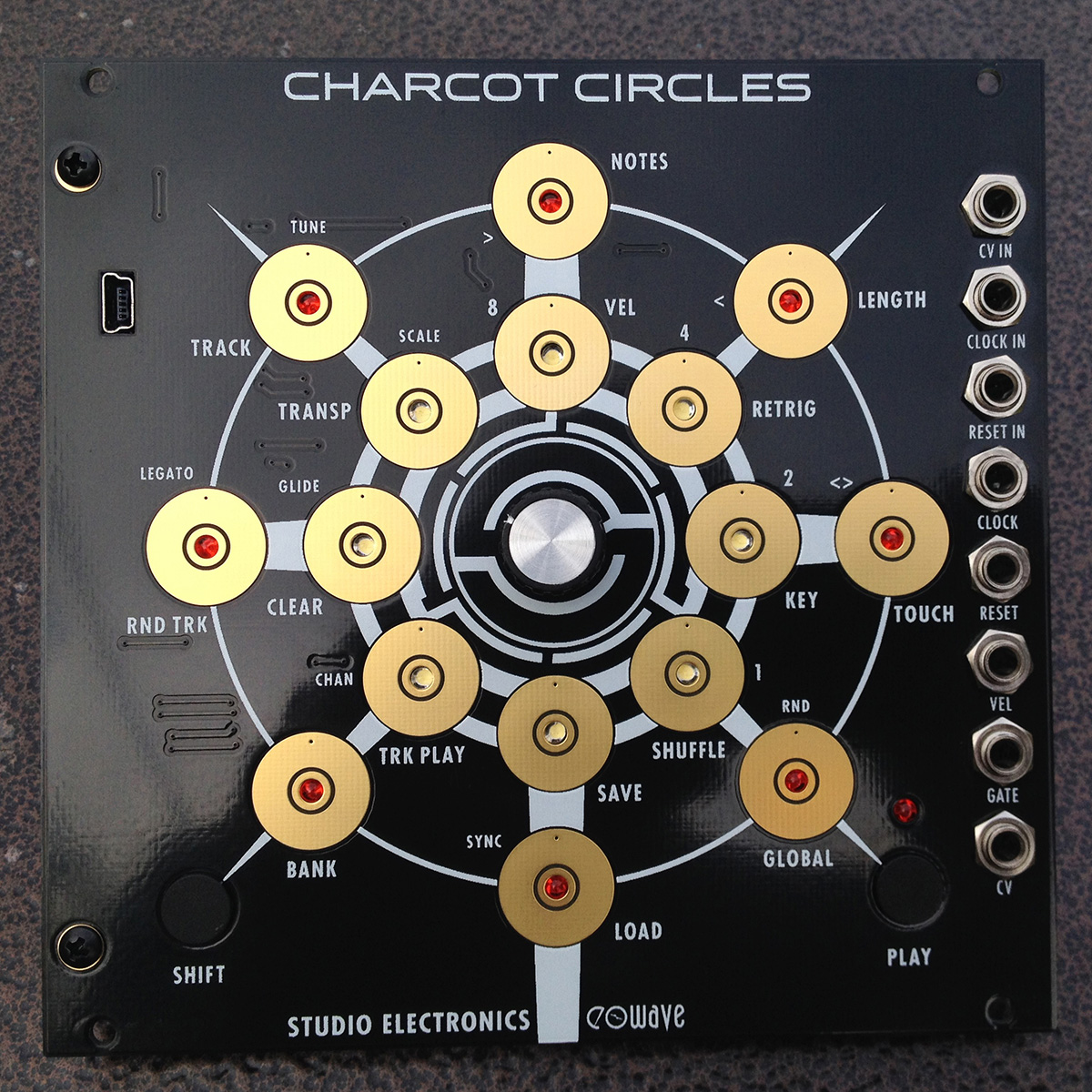
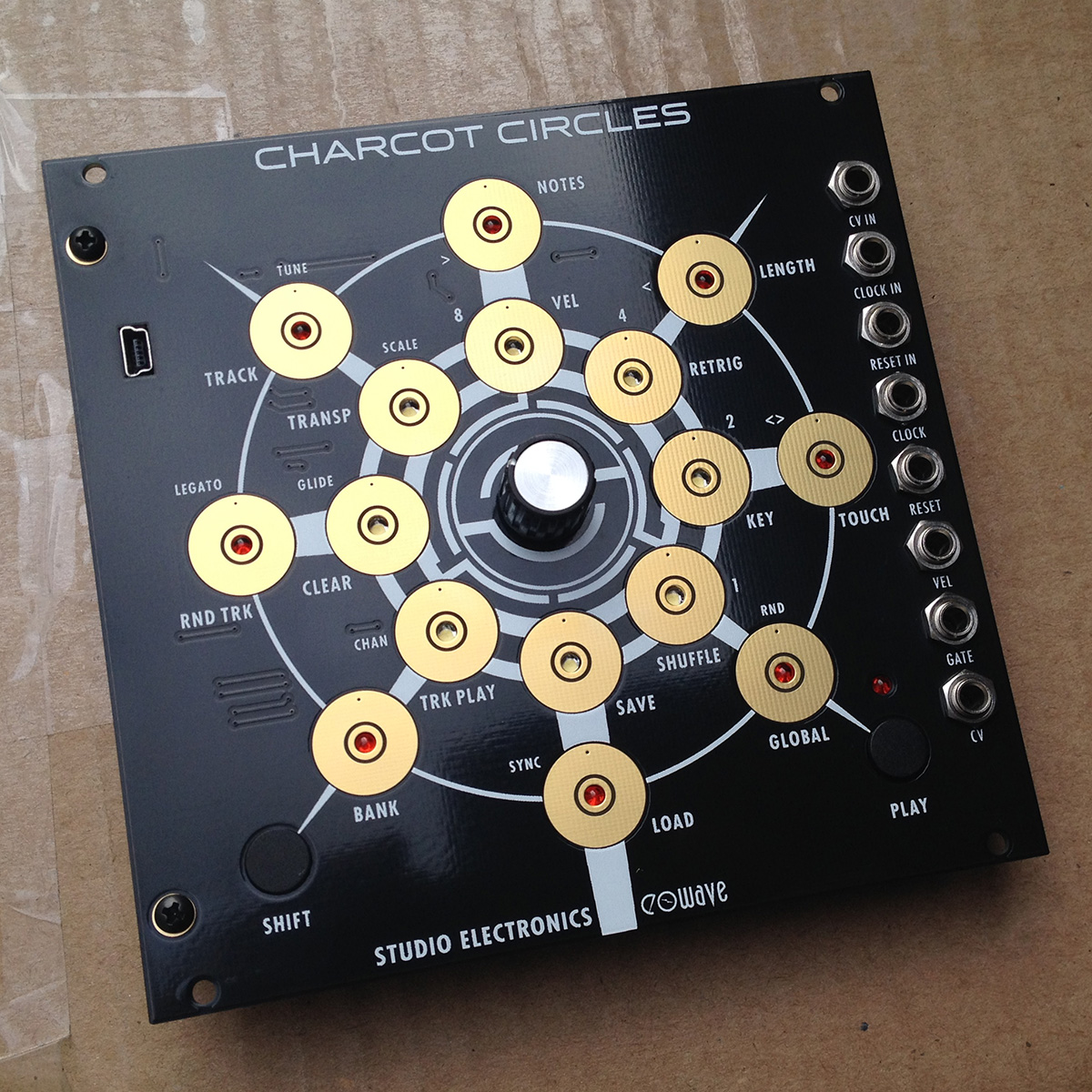
Pad 1. NOTES (Steps): Tap on or off to arm notes. 1/8 notes are on the outside circle, 1/16 notes inner. Press and hold a step, turn the encoder to change the pitch.
Pad 2. VEL (Velocity): Sets velocity value. Press and hold a step, turn the encoder to change the amount.
Pad 3. LENGTH: Sets length of individual step—think of it as sustain. Press and hold a step, turn the encoder to increase the length to up to 16th bars.
Pad 4. RETRIG (Retrigger): Sets the amount of times the step will be repeated. Press and hold a step, turn the encoder to set the number of repeats.
Pad 5. TOUCH: Pressure sensitive “Key” mode—at this point a stepping Theremin.
Pad 6. KEY: Allows individual control of notes which sustain while pressed; also sets note range and reset point: select one of the 16 pads for the start note, and another for the end.
Pad 7. GLOBAL: The first four default parameters set the direction of sequence:
> Forward direction
< Backward direction
<> Pendulum
RND (Random) Selects a designless firing of notes. To access and change values for sub functions TUNE, SCALE, LEGATO, GLIDE, CHAN, SYNC, press and hold desired step, and turn encoder.
TUNE: Tunes the CV output; hold the pad and turn the encoder to adjust the overall tuning.
SCALE: Sets one of sixteen scales; default is chromatic.
LEGATO: Sets the legato; only legato notes will glide.
GLIDE: On/off & speed. Hold the pad and turn the encoder to adjust the glide time.
CHAN (Channel): Sets the base MIDI channel—you only can change the base midi channel; other tracks add that base channel # to their track number like so: if Base MIDI CH is 1, TK 1 -> CH1, TK2-> CH2... TK8-> CH8. If base MIDI CH is 4, TK 1 -> CH4, TK2-> CH5... TK8-> CH12. If base MIDI CH is 6, TK 1 -> CH6, TK2-> CH7, TK8-> CH14 and so on.
SYNC: Surrenders sequencer to external clock.
Pad 8. SHUFFLE: Sets swing before or after note.
Pad 9. LOAD: Loads preset into RAM by turning encoder, or selecting preset.
Pad 10. SAVE: Saves presets to 128 locations: 8 banks of 16 presets. press the encoder to validate your choice.
Pad 11. BANK: Selects 1 of 8.
Pad 12. TRK (TRACK) PLAY: Selects which tracks are played together or not. Also sets the editing/performance mode for tracks: enable, mute, or edit.
Pad 13. RND TRK (Random Track): Randomizes entire sequence not just direction. Continued presses produce ever more random results.
Pad 14. CLEAR: Clears the active preset's tracks.
Pad 15. TRACK (Groups of 16-128 steps): Selects track to be edited on outer circle—mute track on inner circle.
Pad 16. TRANSP (Transpose): Each pressure pad changes key, or turning encoder in TRANSPOSE mode changes key.
SHIFT: Press and hold for selecting feature set mode; pressed together with PLAY will activate record.
Up to 2 breakout boxes can be connected to generate up to 8 CVs and 8 gate outputs.
Per note/track pitch, velocity, and length, with 256 track memory locations.
Pad 2. VEL (Velocity): Sets velocity value. Press and hold a step, turn the encoder to change the amount.
Pad 3. LENGTH: Sets length of individual step—think of it as sustain. Press and hold a step, turn the encoder to increase the length to up to 16th bars.
Pad 4. RETRIG (Retrigger): Sets the amount of times the step will be repeated. Press and hold a step, turn the encoder to set the number of repeats.
Pad 5. TOUCH: Pressure sensitive “Key” mode—at this point a stepping Theremin.
Pad 6. KEY: Allows individual control of notes which sustain while pressed; also sets note range and reset point: select one of the 16 pads for the start note, and another for the end.
Pad 7. GLOBAL: The first four default parameters set the direction of sequence:
> Forward direction
< Backward direction
<> Pendulum
RND (Random) Selects a designless firing of notes. To access and change values for sub functions TUNE, SCALE, LEGATO, GLIDE, CHAN, SYNC, press and hold desired step, and turn encoder.
TUNE: Tunes the CV output; hold the pad and turn the encoder to adjust the overall tuning.
SCALE: Sets one of sixteen scales; default is chromatic.
LEGATO: Sets the legato; only legato notes will glide.
GLIDE: On/off & speed. Hold the pad and turn the encoder to adjust the glide time.
CHAN (Channel): Sets the base MIDI channel—you only can change the base midi channel; other tracks add that base channel # to their track number like so: if Base MIDI CH is 1, TK 1 -> CH1, TK2-> CH2... TK8-> CH8. If base MIDI CH is 4, TK 1 -> CH4, TK2-> CH5... TK8-> CH12. If base MIDI CH is 6, TK 1 -> CH6, TK2-> CH7, TK8-> CH14 and so on.
SYNC: Surrenders sequencer to external clock.
Pad 8. SHUFFLE: Sets swing before or after note.
Pad 9. LOAD: Loads preset into RAM by turning encoder, or selecting preset.
Pad 10. SAVE: Saves presets to 128 locations: 8 banks of 16 presets. press the encoder to validate your choice.
Pad 11. BANK: Selects 1 of 8.
Pad 12. TRK (TRACK) PLAY: Selects which tracks are played together or not. Also sets the editing/performance mode for tracks: enable, mute, or edit.
Pad 13. RND TRK (Random Track): Randomizes entire sequence not just direction. Continued presses produce ever more random results.
Pad 14. CLEAR: Clears the active preset's tracks.
Pad 15. TRACK (Groups of 16-128 steps): Selects track to be edited on outer circle—mute track on inner circle.
Pad 16. TRANSP (Transpose): Each pressure pad changes key, or turning encoder in TRANSPOSE mode changes key.
SHIFT: Press and hold for selecting feature set mode; pressed together with PLAY will activate record.
Highlights, Clarifications, and Recaps
Breakout box (BBox) allows for 4x multichannel/mult-CV use.Up to 2 breakout boxes can be connected to generate up to 8 CVs and 8 gate outputs.
Per note/track pitch, velocity, and length, with 256 track memory locations.
Patch It
Eight patch points: CV IN, CLOCK IN, RESET IN, CLOCK (out), RESET (out), VEL (out), GATE (out), CV (out).Patch Points Detail
CV IN – Control voltage input. CLOCK IN – Clock source can be a square wave or gate signal (positive logic).
RESET IN – Positive voltage resets the Sequencer to the first step.
CLOCK (out) – Outputs a pulse per step. The default step setting is 1/16 (1/16th note). in note mode press SHIFT and PLAY together, and turn the encoder to divide the master tempo.
RESET (out) – Positive reset voltage output.
VEL (out) – Velocity (note/step level) output.
GATE (out) – 0/+5v trigger output.
CV (out) – Control Voltage output.
Additional Connections
USB in/out - Update software via USB HIDBootloader/Import and export sequence data via Max7.
Vitals
Size - 26hp»
News
![[NAMM] 3 modules chez Studio Electronics](https://img.audiofanzine.com/img/product/normal/2/4/248514.jpg?fm=pjpg&w=80&s=3bcf3797196b0261f73bb940b4dd55a9)
Autres catégories dans Synthétiseurs modulaires


Où acheter Charcot Circles ?
Moins
Il n’y a pas de petite annonce pour ce produit.